
After reading my blog posts like Femtocli: A small but mighty CLI library for small CLI tools in < 45KB, you probably know that I like small Java libraries and tools. But consider you have an existing CLI tool (like jstall in my case) and you want to reduce its JAR size. What are your options? This is what this short blog post is all about.
TL;DR: You can shrink your CLI tools by 50% use the femtojar project.
Changing the Source Code to Reduce Size
Of course, you could manually change your source, e.g.
- Inlining methods to save on method metadata and overhead
- Reducing strings (smaller error messages, …)
- Replacing Java records with normal classes
- … without getters if you want to get even smaller
- Not using Java streams or non-integer switches
But these changes are cumbersome and prevent maintainability. Wouldn’t it be cool if there were a cool option that optimized sizes directly with an integration into Maven?
In comes my new femtojar open-source project.
Introducing femtojar
Femtojar uses a reencoding of the JAR file (more later) and, optionally, ProGuard to optimize the bytecode and compress the JAR, drastically reducing the JAR size.
Using it is as easy as adding the following to your pom:
<plugin>
  <groupId>me.bechberger</groupId>
  <artifactId>femtojar</artifactId>
  <version>0.1.6</version>
  <executions>
    <execution>
      <goals>
        <goal>reencode-jars</goal>
      </goals>
    </execution>
  </executions>
</plugin>
This will optimize the JAR named ${project.build.finalName}.jar in place in the package phase of your Maven build. Of course, you can configure which JAR’s should be optimized and how the optimized file should be called:
<plugin>
  <groupId>me.bechberger</groupId>
  <artifactId>femtojar</artifactId>
  <version>0.1.6</version>
  <executions>
    <execution>
      <goals>
        <goal>reencode-jars</goal>
      </goals>
    </execution>
  </executions>
  <configuration>
    <failOnError>true</failOnError>
    <skip>false</skip>
    <compressionMode>MAX</compressionMode>
    <bundleResources>true</bundleResources>
    <jars>
      <jar>
        <in>${project.build.finalName}.jar</in>
        <out>${project.build.finalName}-optimized.jar</out>
      </jar>
      <jar>
        <in>other.jar</in>
      </jar>
    </jars>
  </configuration>
</plugin>
You might also use the tool on the command line.
The reductions are quite impressive: As of writing, a jstall minimal build (without async-profiler binaries and before this used femtojar) has 0.432MB (see). With femtojar, we can reduce the jstall JAR to just 0.2MB, setting the compression level to MAX. Even without using ProGuard, femtojar alone can achieve a size reduction to 0.28MB. The optimized jstall JAR still works as expected with minimal performance impact.
This plugin works with Java 17 above, essentially everything the ProGuard supports. I won’t go into the details of what ProGuard does, but it essentially does inlining, dead-code removal, and more. And you might need to optionally pass a ProGuard config to the plugin so that classes like CLI classes are not optimized away.
JAR Compression
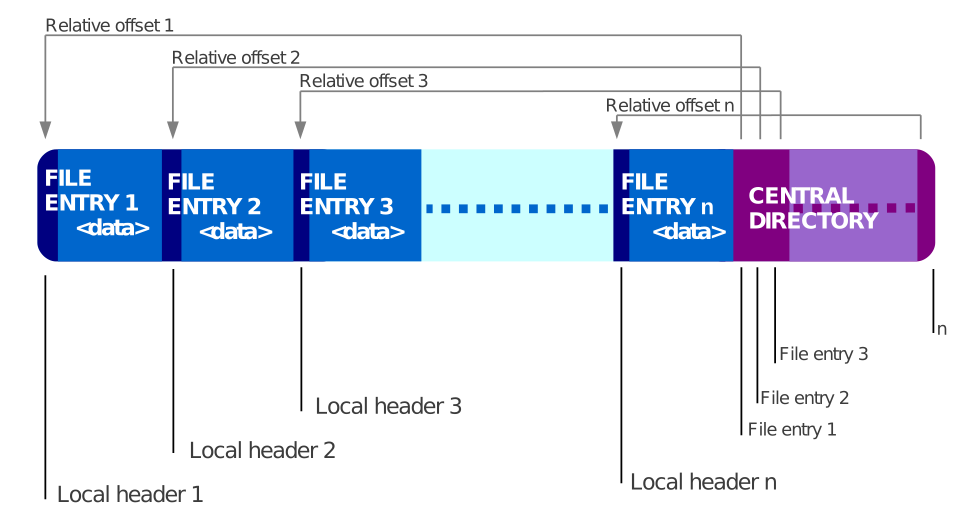
I won’t go into the details of what ProGuard does, but I want to focus the remainder of this blog post on compressing the JAR itself without changing the bytecode. The problem with JARs is that they are essentially ZIP files. And ZIP files are not that good for storing relatively small files, like your many small records, that might share some strings:
Each file is stored separately, allowing different files in the same archive to be compressed using different methods. Because the files in a ZIP archive are compressed individually, it is possible to extract them, or add new ones, without applying compression or decompression to the entire archive. This contrasts with the format of compressed tar files, for which such random-access processing is not easily possible.
WIKIPEDIA
So what femtojar does is that it packs all class files into a single blob with a header in front that specifies where every class lies in this blob:

You might wonder how the JAR can then be executed normally. This is simple, we just use a custom BundleBootstrap classloader that we register as the main class in the Manifest:
public static void main(String[] args) throws Exception {
    new BundleBootstrap().start(args);
}

private void start(String[] args) throws Exception {
    ClassLoader cl = BundleBootstrap.class.getClassLoader();
    parentCL = cl != null ? cl : ClassLoader.getSystemClassLoader();

    readPackedBlob();
    readManifest();
    computeDirectoryPaths();
    resolveJarUrl();

    Thread.currentThread().setContextClassLoader(this);
    if (bundledResourcesEnabled) {
        installFemtojarUrlHandlerFactory();
    }

    // Call the original main class
    String originalMainClass =
        manifest.getMainAttributes()
            .getValue("X-Original-Main-Class");
    if (originalMainClass == null) {
        throw new IOException("Missing X-Original-Main-Class");
    }

    Class<?> mainClass = Class.forName(originalMainClass,
                                       true, this);
    Method mainMethod = mainClass.getMethod("main", String[].class);
    mainMethod.invoke(null, (Object) args);
}
This way, we can compress all class files into a single blob, even though we need to always include the bootstrap class, but it is worth it. But this also means that the optimized JAR probably won’t work as a library without jumping through many hoops.
To further improve the compression, we can then use Zopfli to optimize the ZIP itself:
Zopfli achieves higher data density through more exhaustive compression techniques. The method is based on iterating entropy modeling and a shortest path search algorithm to find a low bit cost path through the graph of all possible Deflate representations of the uncompressed data.
WIKIPEDIA
If you’re wondering, femtojar also handles resources properly (not compressing them).
Conclusion
femtojar is a tiny open-source project to help you reduce the size of your JARs, solving a real problem for me. It’s also really simple to use (especially when not using ProGuard).
I hope this project can be useful to you too.
P.S.: Yes, I know that Java once had Pack200, which also achieved impressive compression results, but it was after Java 14.
This blog post is part of my work in the SapMachine team at SAP, making profiling easier for everyone.